Recover serial number TS3
Da SimsCri Simpedia.
Versione del 1 dic 2010 alle 02:30 di Cristina (Discussione | contributi) (Creata pagina con 'You have searched everywhere and you can't find your game booklet with your serial number... and now? What can you do? Don't worry, if you have registered your game through the [...')
You have searched everywhere and you can't find your game booklet with your serial number... and now? What can you do? Don't worry, if you have registered your game through the EADM, you just need and internet connection... and you can recover your serial number!
What you need
If you want recover your serial number, you need:
- A registered and original copy of the game - during installation or later you should register your game trough the EADM, with your EA account (perhaps the same of www.thesims3.com).
- An Internet connection.
- The EADM installed on your PC. In particular you can view your game's serial number if your EADM version is up to 7. You can download EADM here, if you have disinstalled it or if your version is not up to date.
Recover your serial number
- Connect your PC to Internet
- Launch EADM (from Start→Programs→Electronic Arts→EA Download Manager)
- Connect to your EA Account with your mail and password.
- Once done, you can see the library of your purchased and registered games
- Click on I (information icon). You can see a new page, with Game detail
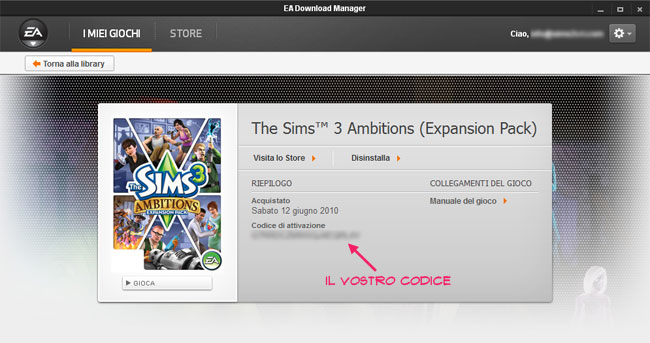
- Here you can see some details, such as purchase date, you can download the booklet... and ... you can get your serial number.


